

If you have edited photos for any amount of time, you already know the real challenge is not clicking a button. It is getting consistent, client-ready results across hundreds or thousands of images, with clean edges, true-to-life colour, and a style that stays the same from batch to batch.
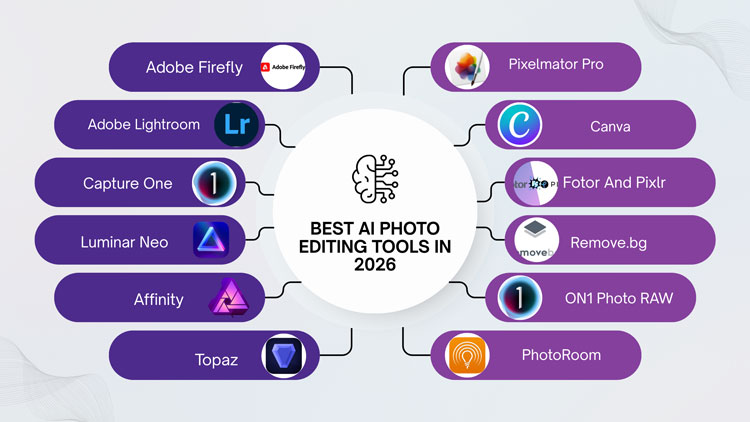
So in this guide, we are going to keep it practical. I will walk you through the best AI photo editing tools in 2026, what each one is actually good at, where it tends to break, and who it is best for. And since many readers here care about professional workflows, we will also talk about the hybrid approach: using AI for speed and expert human retouching for perfection.
Advertisement. Moving from still images into video? Browse DaVinci Resolve colour and editing tutorials at DaVinci Resolve Club. Its independent guides bring together timeline editing, grading, Fairlight audio and delivery, with separate help for Free and Studio decisions.
What Makes An AI Photo Editor “Best” In 2026?
Most tools can now do the basics. The difference is in reliability, control, and how well the tool fits into a real workflow. A “best” tool in 2026 usually checks most of these boxes:
It produces clean, believable edits without strange textures, warped details, or “AI plastic” skin. It keeps edges stable around hair, fur, transparent products, and complex shapes. It gives you controls that feel like editing, not gambling. It supports RAW, exports in the formats you need, and does not destroy metadata. And if you work in volume, it needs batch capability that does not fall apart on image 37.
One more point people forget: the best tool is also the one you can correct quickly. AI will be wrong sometimes. Your job is to pick a tool where fixing the mistakes is fast.
1. Adobe Photoshop (Firefly-Powered Features)
Photoshop is still the centre of gravity for professional editing, and in 2026 its AI features are no longer “fun extras.” They are part of daily production work. Generative Fill, object removal, smart expand, neural filters, auto masking, and selection tools have matured into something you can trust more often than not. What Photoshop does best is control. Even when you use AI, you can stay non-destructive with layers, masks, adjustment layers, smart objects, and blend modes. That matters if you are delivering to clients who expect revisions, or if you are working on eCommerce imagery where consistency is everything.
Where Photoshop can still frustrate is speed for bulk tasks. Yes, you can automate with actions, scripts, droplets, and batch processes. But if your workflow is “edit 1,200 SKUs before Friday,” you may still want a dedicated batch-first tool upstream, then finish the final 10 percent in Photoshop.
Photoshop is ideal for professional retouching, product photo refinement, complex composites, brand campaigns, and any situation where you need the most control and the cleanest final file.
2. Adobe Lightroom (AI Masking And Adaptive Presets)
Lightroom remains one of the best “make 500 photos look great” tools on the planet. In 2026, its AI masking is a huge part of why. Subject selection, sky masking, people masking, and object-based selections are fast and usually accurate. The magic is how quickly you can apply targeted adjustments across a whole set while keeping the look consistent.
Lightroom’s best use case is high-volume photography where the edits are about tone, color, exposure, detail, and style consistency. Wedding photographers, event shooters, real estate photographers, and editorial teams love it because it is fast without feeling random.
The limitation is that Lightroom is not meant for heavy pixel surgery. If you need complex background replacements, advanced skin retouching, or detailed product cleanup, you will often move into Photoshop or a specialized retouching workflow.
If your job is to deliver clean, cohesive galleries quickly, Lightroom is still an elite choice in 2026.
3. Capture One (Pro Color With Smart Assistance)

Capture One is still the tool many professionals prefer when color fidelity is non-negotiable. It is loved in studio environments, fashion, commercial shoots, and product photography because of its tethering, color tools, and controlled workflow.
In 2026, its “smart” features are more helpful than they used to be, especially for speeding up selections and repetitive adjustments. But the real reason to pick Capture One is not flashy AI. It is the disciplined, predictable results.
If your brand work requires consistent color across campaigns, or you work in a controlled studio setup, Capture One is a strong cornerstone tool. Pair it with a pixel editor when you need deep retouching.
4. Luminar Neo (Fast AI Looks With Simple Controls)
Luminar Neo is one of the easiest ways to get visually striking results without building a complex workflow. It is popular with creators, small businesses, and photographers who want punchy edits, dramatic skies, portrait enhancements, and stylised looks.
Its AI tools are generally good at quick transformations: relighting, sky replacement, background adjustments, portrait enhancements, and mood changes. The biggest advantage is that it feels approachable. You can move sliders and get results that look “done” fast.
The tradeoff is precision. If you zoom in and inspect edges, skin texture, hair masking, or product details, you may need extra cleanup. It is not a problem if your output is social, web, or small prints. It becomes a problem in strict commercial retouching where artifacts are unacceptable.
Luminar Neo is best for fast creative edits, content creators, and photographers who want AI-driven style with minimal friction.
5. Affinity Photo (Value, Control, And Growing AI Features)
Affinity Photo keeps gaining ground because it offers serious editing power without locking you into a subscription. In 2026, it is still not “the most AI-first” editor, but its toolset is strong enough for professional work, and its performance can be excellent on modern hardware.
If you want a Photoshop-like editing experience with layers, masks, and advanced adjustments, Affinity is a compelling option. As AI features grow in this ecosystem, it becomes even more attractive for teams that want cost control.
Where Affinity can lag is in the sheer breadth of AI-driven conveniences and third-party integrations compared with Adobe’s ecosystem. But if you value ownership, speed, and a powerful editor, it deserves a place on this list.
Affinity Photo is best for designers, photographers, and small teams that want pro-level editing with better long-term cost predictability.
6. Topaz Photo AI (Upscaling, Denoise, And Sharpening That Actually Helps)
Topaz Photo AI is the tool people reach for when they need to rescue an image. It is especially strong for noise reduction, sharpening soft shots, and upscaling with believable detail.
In 2026, upscaling matters more than ever because images end up everywhere: marketplaces that crop aggressively, clients requesting large banners, and legacy assets that need new life. Topaz is often the difference between “this is unusable” and “this is deliverable.”
It is not a full editor. It is a specialist. But it is so good at its speciality that it belongs in many professional workflows, especially when you are dealing with low light, older cameras, compressed files, or imperfect source images.
Topaz Photo AI is best for photographers, eCommerce teams, and agencies that need reliable enhancement for sharpness, noise, and resolution.
7. Pixelmator Pro (Mac-Friendly AI Editing That Feels Fast)
If you work on a Mac and want something that feels modern and responsive, Pixelmator Pro remains a favourite. It is clean, quick, and includes AI features that help with selections, cleanup, and smart adjustments.
It is not trying to be the most enterprise-grade tool. It is trying to be the tool you enjoy using, while still shipping professional-quality output. For many creators, that matters more than feature checklists.
Pixelmator Pro is best for Mac users, creators, and small business owners who want powerful editing without the overhead of heavyweight suites.
8. Canva (AI Design-First Editing For Marketing Teams)
Canva is not a traditional photo editor, but in 2026 it is absolutely a practical AI photo editing tool for marketing and content workflows. Background removal, quick retouching, resizing, design layouts, brand kits, and fast export options make it incredibly useful for teams that need speed and consistency across platforms.
The key is to use Canva for what it is best at: marketing production. If your end goal is a product page banner, a social ad, a thumbnail, or a quick promo graphic, Canva saves time.
Where Canva struggles is pixel-level perfection. It is not built for high-end retouching, advanced compositing, or strict eCommerce image standards. Many teams use it after the images are professionally edited, not before.
Canva is best for social media teams, startups, agencies producing lots of creatives, and anyone who needs fast, on-brand design outputs.
9. Fotor And Pixlr (Quick Browser-Based AI Editing)
Fotor and Pixlr continue to serve a very specific audience: people who want quick edits without a heavy desktop workflow. In 2026, these tools often include one-click enhancements, background removal, retouching, filters, and basic AI effects.
If you are working on the go, doing occasional edits, or need a simple browser-based option, these tools can be surprisingly handy. The main limitation is consistency and control. For professional delivery, you may outgrow them quickly, especially when you need layered files, precise masking, or consistent export settings.
They are best for casual users, quick content tasks, and lightweight editing when speed matters more than absolute perfection.
10. Remove.bg And Specialized Background Tools (For Pure Cutouts)
Sometimes you do not need a “photo editor.” You need a clean cutout. Specialized tools like Remove.bg and similar background-removal services are still relevant in 2026 because they do one job very quickly.
For simple subjects, they can be excellent. For complex hair, transparent objects, soft edges, or product photography with fine details, they can be hit-or-miss. The biggest mistake people make is assuming a background removal is “final.” For professional eCommerce, it often needs refinement, edge cleanup, shadow creation, and quality checks.
These tools are best for quick mockups, internal drafts, and speeding up the first pass before final human or Photoshop refinement.
11. ON1 Photo RAW

ON1 Photo RAW is a hybrid photo editor that combines traditional editing features with AI-based automation. “It’s a very versatile device that will appeal to those photographers who want speed and creative control.” It also has clever topic and scene detection to minimise the manual masking and fine tweaking required.
AI functions include AI masking, noise reduction, upscaling, portrait enhancement, object removal, and automatic image optimisation. These capabilities optimise the editing process, while retaining image quality and producing natural-looking alterations.
12. PhotoRoom
PhotoRoom is an AI picture editor for clean and professional photos for eCommerce, marketing and social media. Users can take any casual picture and create professional photographs without any advanced editing training.
AI lets software automatically remove backdrops, delete undesirable objects, add new backgrounds, improve photo quality and resize pictures for different platforms. These automations accelerate product photography and content generation and democratise it.
13. Picsart AI

Picsart AI is a complete creative editor with AI-powered photo editing & graphic creation. “It allows for complex modifications through simple prompts and automatic features, as opposed to tedious editing processes.
It has an AI toolset which includes a background remover, object replacer, generative fill, image upscaler, AI filters and a content generator. These technologies can allow designers to swiftly edit photos, create marketing visuals and experiment with AI-powered creative ideas.
14. Radiant Photo
Radiant Photo is an AI photo enhancer software that promises to increase the quality of photos automatically and keep them looking natural. It doesn’t just apply a generic setting, it analyses each particular photograph to determine what enhancements would be optimal.
The AI cleverly assesses the image content and adjusts exposure, colour balance, lighting, sharpness and detail accordingly. This computational approach allows photographers to make colourful and realistic photographs with minimal human modification but still preserving the essence of the original photo.
Comparison of the AI Photo Editing Tools
| Tool | Core Focus | Key AI Features | Strengths |
| Adobe Photoshop | Professional Manipulation | Generative Fill/Expand, Neural Filters | Industry standard; powerful generative AI & object replacement. |
| Adobe Lightroom | Pro Workflow & Cataloging | Generative Remove, AI Masking (Subject/Sky) | Best-in-class AI masking and raw processing workflow. |
| Capture One | Pro Raw Editing & Tethering | AI Masking (Subject/Background), Smart Adjustments | Ultra-fast professional tethering with emerging AI tools. |
| Luminar Neo | Creative AI-First Editing | Sky AI, Enhance AI, Face/Body AI, Relight AI | Heavily AI-driven; excellent for quick, dramatic creative enhancements. |
| Affinity Photo | Pro Layered Editing | Basic AI selection tools, focus/HDR merging | Powerful, subscription-free alternative; less reliant on cloud generative AI. |
| Topaz Photo AI | Enhancement & Repair | AI Denoise, AI Sharpening, AI Upscaling | Absolute best for rescuing low-quality, blurry, or noisy photos. |
| Pixelmator Pro | Mac-optimized Creative Editing | ML Super Resolution, ML Enhance, Smart Deblur | Fast, affordable, and deeply integrated with Apple’s hardware ML. |
| Canva | Graphic Design & Marketing | Magic Edit, Magic Grab, Background Remover | Great for quick social graphics and simple generative elements. |
| Fotor | Browser-based Quick Editing | AI Portrait Enhancer, AI Background/Object Remover | Accessible browser tool for quick filters, touch-ups, and effects. |
| Pixlr | Browser-based Creative Editing | AI Image Generator, Generative Fill, AI Remove | Layer-based browser editing with decent generative web tools. |
| Remove.bg | Automation / E-commerce | Pure AI Background Removal | Single-purpose tool; exceptionally fast and accurate bulk extraction. |
| ON1 Photo RAW | All-in-one Pro Editing | Brilliant AI (Masking), NoNoise AI, TacSharp AI | Strong local-processing alternative to Lightroom with robust AI. |
| PhotoRoom | E-commerce Product Photos | AI Product Backgrounds, Instant Shadows/Lighting | Superb for clean, professional studio-quality product mockups. |
| Picsart AI | Social Media & Mobile Editing | AI Replace, AI Enhance, Background Remover | Fun, trendy generative tools tailored for fast mobile/social content. |
| Radiant Photo | Automatic Color Correction | Smart Radiant Tone & Color Analysis | Excellent for instant, natural-looking exposure and color optimization. |
The Smart Way To Use AI Photo Tools In 2026 (Without Quality Dropping)
Most professionals end up with a hybrid workflow. AI helps you move faster, but you keep quality by deciding what AI is allowed to touch.
Here is a simple rule that works in real production: let AI handle broad strokes, and let humans handle brand-critical details. Broad strokes are things like initial masking, basic cleanup, global color work, noise reduction, and quick variations. Brand-critical details are product edges, true color, skin texture, logo integrity, and anything a client will zoom into.
When you treat AI as a fast assistant instead of a final judge, your turnaround time improves without sacrificing quality.
A Practical Stack For Different Types Of Work
You can mix tools based on the job. In 2026, the “best” setup is rarely one tool.
For high-volume photography, Lightroom for consistent color and exposure, then Photoshop for hero images and detailed retouching, is still hard to beat. For studio product work, Capture One for tethering and color, then Photoshop for finishing, is a common workflow. For image rescue and enhancement, Topaz Photo AI often plugs into either workflow nicely. For marketing production, Canva is often the final stop after images are cleaned and ready.
That is the bigger idea: pick your core editor, then add one or two specialists that solve your most expensive bottleneck.
Where Human Editing Still Beats AI (And Probably Will For A While)
Even in 2026, there are areas where human skill is still the difference between “fine” and “premium.” Product photo editing is a perfect example. Clean edges, dust removal, scratch cleanup, true color matching, consistent shadows, symmetrical alignment, and catalog-level uniformity require judgment and patience. AI can help, but it does not reliably meet strict guidelines without oversight.
High-end portrait retouching is another. Great skin retouching is not about removing pores. It is about keeping texture while controlling tone, shine, under-eye balance, and color shifts. AI often over-smooths, or it changes facial details in a way clients do not like.
This is where professional editing teams still matter, especially when you are working at scale or selling premium products.
Why Many Brands Use AI Plus A Professional Editing Partner
If you are running an eCommerce brand, a photography studio, or a marketing team, your main constraint is usually time. You need speed, but you also need consistency. AI gets you speed. A professional editing partner gets you consistency and accountability.
A good partner can match your brand style, follow your guidelines, deliver tight cutouts, maintain natural textures, and handle complex requests like ghost mannequin effects, multi-path clipping, advanced retouching, shadow creation, color correction, and catalog consistency. AI tools can assist in parts of that workflow, but the final quality control is still best handled by humans who do this every day.
This is also where experience matters. A team that has been doing professional editing for many years will spot problems quickly, build repeatable processes, and deliver results that do not surprise you on launch day.
FAQs
What Is The Best AI Photo Editing Tool In 2026?
The best tool depends on your workflow. Photoshop leads for precision, Lightroom for batch consistency, and Topaz for enhancement. Many professionals combine two or three tools for speed and control.
Are AI Photo Editors Good Enough For Professional Ecommerce Images?
They can help with first-pass cleanup, masking, and enhancements, but strict eCommerce standards still require human review. Edges, color accuracy, and consistent shadows often need manual finishing.
Which AI Tool Is Best For Background Removal?
Specialised tools like Remove.bg are fast for simple subjects, while Photoshop offers more control for complex edges. For hair, transparent items, or fine product details, manual refinement is usually needed.
Can AI Replace Photoshop For Most People?
For casual creators, sometimes yes. For professionals delivering layered files, complex composites, or brand-critical retouching, Photoshop still offers unmatched control, non-destructive workflows, and correction options.
What Is The Best AI Tool For Noise Reduction And Upscaling?
Topaz Photo AI is widely used for denoising, sharpening, and upscaling. It is especially helpful for low-light images, older files, or shots that need to be printed or used in large formats.
Is Lightroom Better Than Luminar Neo?
Lightroom is better for consistent batch editing and catalog workflows. Luminar Neo is better for fast, stylised edits and dramatic transformations. Many photographers use Lightroom for the base, then Luminar for creative variations.
Do AI Editors Damage Image Quality?
They can, especially with aggressive skin smoothing, over-sharpening, or generative edits that introduce artifacts. The best approach is subtle use, plus zoomed-in checks before delivery and export.
How Do I Keep A Consistent Editing Style With AI?
Use presets, profiles, and saved settings for repeatable results, then apply AI features selectively. For teams, a style guide plus final quality control is the simplest way to keep consistency.
Is Canva A Real AI Photo Editing Tool?
For marketing workflows, yes. It is excellent for quick background removal, resizing, and design output. For high-end retouching and pixel-level control, you will still need a dedicated editor like Photoshop.
When Should I Outsource Photo Editing Instead Of Using AI?
Outsource when quality must be perfect, volume is high, deadlines are tight, or edits are complex. AI can speed up drafts, but professional editors deliver consistent, client-ready output with fewer surprises.
Final Thought
If you are using AI tools but still spending hours fixing edges, correcting color, or redoing “almost right” results, that is a sign you need a stronger production workflow.
At Zenith Clipping, we have been doing professional photo editing since 2010. We are a Bangladesh-based team with 150+ Photoshop professionals and 16+ years of experience in editing services, built on a simple promise: deliver high-quality, creative work for clients worldwide, consistently and on time.
If you want a reliable team to handle clipping paths, background removal, product retouching, ghost mannequin, color correction, shadow creation, or high-volume catalog work, we are ready to help. Send us a few sample images and your guidelines, and we will take it from there.