

Photoshop Texturing Service
At Zenith Clipping, we add carefully chosen textures that bring depth, clarity, and realism to your floor plans, elevations, sections, and site plans, without losing the clean line work that makes them readable.
Price Starts from
$15
Unlimited Revisions without Extra Cost
24/7
Support
Upto 10% Discount on
Bulk Orders
Your Professional Photoshop Texturing Service Provider
Zenith Clipping is a Professional Photoshop Texturing Company in Bangladesh with more than 50 Photoshop Texturing professionals. We have 16 more years of experience in Photoshop Texturing Service. We have become one of the fastest-growing Photoshop Texturing Service providers since 2010.
We’re confident, that you’ll love working with us.
Note: No Free Trial for Photoshop Texturing Service
Get A Custom Quote
What a Photoshop Texturing Service Actually Means (for Architecture)
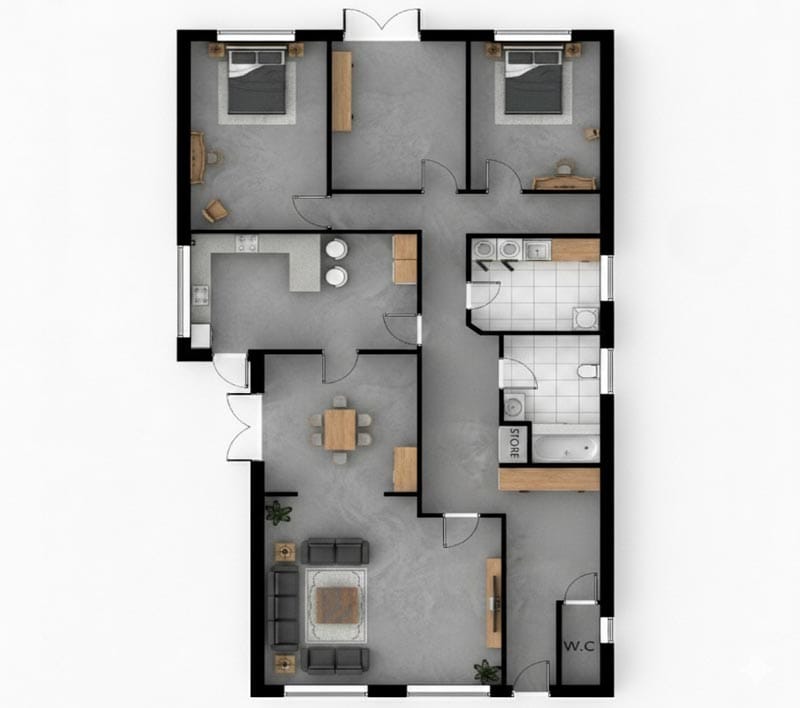
In an architectural context, Photoshop texturing means applying realistic or stylized materials to drawings so they communicate design intent clearly. Think wood planks that run in the right direction, concrete that feels like concrete, tiles that read at the correct scale, and landscape textures that make a site plan understandable in five seconds.
Common textures we add include wood, stone, concrete, brick, tiles, carpet, grass, water, paving, roofing, cladding patterns, and light glazing cues. The goal is not to “paint over” architecture. The goal is to make the drawing easier to interpret, more attractive to look at, and more persuasive for whoever is reviewing it.
Benefits of Photoshop Texturing Service in Architecture
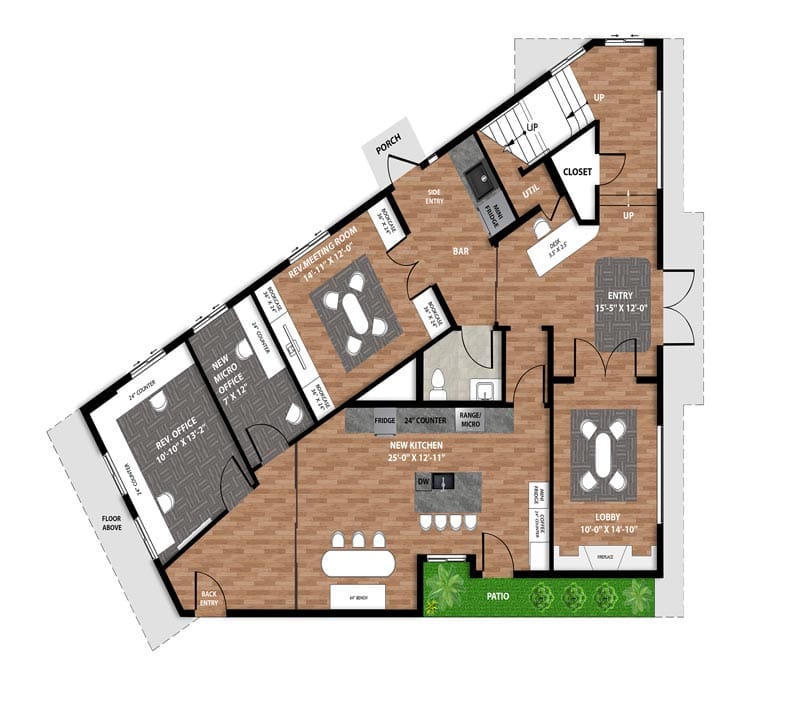
The biggest benefit is realism without the heavy lift. With professional texturing, your drawings instantly feel more “finished,” which helps clients trust what they’re seeing and makes your design intent harder to misunderstand.
It also saves serious production time. Instead of spending hours hunting textures, masking areas, fixing scale problems, and trying to keep everything consistent across multiple sheets, you can hand off the texturing to a dedicated team and focus on design, coordination, and delivery.
And yes, the visuals simply look better. The right textures add depth, improve hierarchy, and guide the eye to key areas. That extra polish often translates into smoother presentations, fewer revision loops, and stronger results in bids, proposals, and competitions.
Who Uses Architectural Texturing
Architectural texturing is used by more teams than people realize, mainly because it solves a very practical business problem: it makes drawings easier to approve, easier to market, and easier to standardize.
Architects and interior designers use textured plans and elevations to speed up client approvals. When materials are visually obvious, you get fewer “Wait, is this timber or tile?” moments, and you reduce back-and-forth.
Developers and real estate teams use textured plans and façade visuals because they are marketing-friendly. A clean, attractive plan works better in brochures, listings, investor decks, and signage.
The value is straightforward: faster decisions, fewer revisions, better presentations, and stronger chances of winning work.
Common Deliverables We Texture in Photoshop
Most of our Photoshop texturing work at Zenith Clipping falls into a few repeatable deliverables, which is great because it means we can scale your production without sacrificing consistency.
Textured floor plans are one of the most requested items. We apply room-by-room materials like timber, tile, carpet, rugs, and simple furniture overlays, while keeping labels clear and the plan easy to read at print size.
Architectural elevations and sections are another common request. Here we add façade materials, cladding patterns, roofing cues, glazing hints, and subtle shadows to create depth, but we avoid over-rendering that can make drawings look muddy or too “illustrative.”
Site plans and landscape plans benefit hugely from texturing. Grass, paving, roads, water, planting zones, and boundary clarity can turn a confusing plan into a presentation-ready graphic.
We also texture architectural diagrams, where the focus is clarity. That includes material callouts, hatch systems, legend blocks, and clean color rules that match your studio’s visual language.
To match different audiences, we can deliver light, medium, or heavy texture versions. Many teams use a lighter version for approvals, a clean version for permit-style documents, and a richer version for marketing.
Our Photoshop Texturing Workflow (Step-by-Step)
Our workflow is designed to be predictable, especially for agencies managing multiple sheets and multiple stakeholders.
First, we do file intake and instruction review. We look for your style references, brand colors, required materials, and any “must follow” standards so we can match your existing set.
Next, we prepare a clean base. That can include aligning and straightening scans, isolating linework, removing noise, and setting scale if needed. A clean foundation is what makes textures look professional instead of pasted on.
Then we apply textures and materials with controlled masking and correct scaling. This is where details like tile size, plank direction, and pattern alignment matter. After that, we add depth while protecting readability. Subtle highlights and shadows help, but text and annotations must stay legible.
Before delivery, we run a consistency pass. We check uniform texture scale, cohesive color palette, and alignment across all sheets so the set feels like one system, not separate files.
Finally, we export and deliver. You can receive layered PSDs plus print-ready PDF, PNG, or JPG files, with clear naming conventions and versioning so your team can plug them into layouts immediately.
Why Outsource Photoshop Texturing to Zenith Clipping
texture a plan.” We operate as a specialized partner for architecture-related Photoshop texturing, including floor plans, architectural drawings, site plans, and presentation visuals that need to look consistent across a full package. Because we have 150+ Photoshop professionals, we can handle volume: multi-floor sets, multiple options, or multiple projects running in parallel, without slowing your pipeline. Our clients work globally, and our workflow is remote-friendly for teams in the US, Canada, Australia, the UK, EU, New Zealand, and beyond. Quality is not a promise, it is a process. We use a 3-step quality check supported by a dedicated group of quality controllers, and we follow client instructions closely. That matters most when you need agency-friendly consistency: same texture scale, same palette logic, and the same look across every deliverable.
How to Get Started
If you are new to Zenith Clipping, you can start with a free trial so you can evaluate our texturing quality and see how well we match your style before committing to a full project. If you want a reliable Photoshop texturing partner for architectural floor plans and drawings, Zenith Clipping is ready to jump in and make your visuals look sharper, clearer, and more client-ready.
Are you looking for a Photoshop Texturing Service provider? Let’s try Zenith Clipping!
Frequently Asked Questions
How does it work?
You bring in your photographs and needs, and then editors utilize Photoshop to add details, modify the lighting, and add texture. After the adjustments are made, the final outputs are sent back and forth to make sure they are of good quality and that the client is happy.
What does the texturizer do in Photoshop?
To access the Texturizer filter, click to Filter > Filter Gallery > Texture > Texturizer. You can add canvas, sandstone, or custom textures to pictures and modify the size, relief, and direction of the light.
How do you make your images look more natural in Photoshop?
Use texture images that are very detailed, blending modes like Overlay or Multiply, alter the opacity, and add noise, shadows, and highlights. Layer masks and little color adjustments let textures mix in with the source image in a way that looks natural.
Why do architects need to have good photographs of things?
High-quality images show the details, textures, and finishes of materials exactly, which helps architects show off their ideas in a professional way. They help you perceive your projects better, make your marketing more engaging, and make customers more likely to trust you.
Do architects often pay other individuals to do their work in Photoshop?
Yes, many architects pay other people to edit their Photoshop files so they may save time and achieve great results. When architects outsource, they may hire skilled editors, get answers faster, and get the same quality every time.
How long does it take to complete the Photoshop Texturing Service?
Texturing work that is simple can take 24 to 48 hours, but architectural renderings that are more complicated might take 2 to 5 days, including making revisions to make sure they are correct and the client is happy.