

You’ve got pictures on your camera or phone. Sometimes pictures don’t look perfect right away. Maybe the colors were wrong, or someone got red eyes. Or maybe a spot on the face. Photo retouching tools help fix that. Makes pictures look nicer. Like magic for photos.
You don’t need to be a big expert to use them. Some tools are easy, some harder. But it all helps make the picture better. Important for making photos look professional. Even if you are just starting. Using retouching tools makes your photos stand out much more. Don’t think it costs too much. There are tools for everyone’s budget. Like Adobe got Photoshop and Lightroom. Good tools for fixing photos are good. Think of it as a necessary thing for good pictures. Makes a big difference.
What Is Adobe Photoshop?

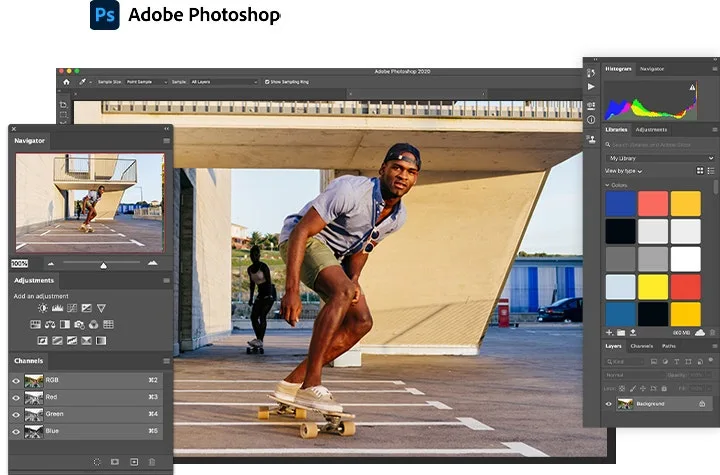
Photoshop is a program for changing pictures. It is very powerful. You can do almost anything with pictures. Take out things you don’t want. Put in new things. Change colors a lot. Fix skin so smooth. Make your eyes pop big. It has many, many tools. Like brushes and layers.
Layers let you work on parts without hurting other parts. Good for complicated edits. Like, if you want to change the background only. Or make someone look thinner. Photoshop is best for when you need to change a picture a lot. Make it look different. But it may be hard to learn everything. Got so many buttons. Take practice. But worth it for big changes.
What Is Adobe Lightroom?

Lightroom is different from Photoshop. It is more about fixing photos fast. Like many photos together. Do you take a lot of pictures? Lightroom helps sort them easily. Find the best ones quickly. Then make them look better in simple ways. Fix brightness, color, and sharpness easily. Make photos warmer or cooler. Crop them straight.
It doesn’t let you cut things out like Photoshop. Or add many new things. Lightroom is good for making a whole bunch of photos look consistent. Like all photos from the party are in the same style. Also, keep your photos organized well. Put in folders. Add tags. So you find out later. Great for photographers to take many photos. Makes the workflow smooth and fast. Less confusing than Photoshop sometimes.
Core Differences Between Photoshop and Lightroom

Photoshop and Lightroom both fix photos. But they are not the same. I think Photoshop is like a big toolbox. Fix one picture deep. Change everything. Lightroom is like a quick fix station. Make many pictures look good fast. Organize them too. Lightroom is better for managing lots of photos. Photoshop is better for making big changes to one photo.
The big difference is the layers. Photoshop has layers. Let you edit parts separately. Lightroom has no layers. Changes affect the whole photo. Also, in Photoshop, you change the picture itself permanently. Lightroom saves instructions on how the picture should look. The original picture stays safe. You can change edits anytime.
Which Is More Beginner-Friendly?

Which is easier? Lightroom is usually easier to start with. Buttons are simpler. Less scary. Made for fixing photos quickly. Sliders for light and color are easy to understand. Good for learning the basics. Photoshop has many more buttons. It looks complicated. It takes longer to learn well.
But Lightroom does not do everything. When I need to remove big things or add text, I need Photoshop. Then it is harder. Some things in Lightroom are easy. But deep edits need Photoshop skills. For just starting, Lightroom is friendlier. Fewer things to learn first. Photoshop power but steep hill climb. Maybe start Lightroom, learn it, then try Photoshop bits.
Workflow and Organization
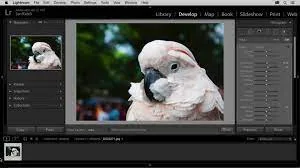
Workflow means how you do your photo work. Lightroom is great for this. You put photos in Lightroom. It keeps a catalog. You see all the small pictures. Pick the best ones. Flag them. Give stars. Then edit them in one place. Changes saved with photo info.
Photoshop is not like that. You open one picture. Edit it. Save it to a new file, usually. It is harder to keep track of many photos. No good system inside Photoshop for organizing. I need to use folders on the computer. Messy sometimes. Lightroom keeps edits non-destructive. Meaning you change your mind later. Photoshop edits often change original pixels. Harder to undo later if saved wrong. Lightroom wins for organizing and workflow, smoothly.
Retouching Capabilities Compared

Both retouch photos. But how good? Lightroom is good for overall fixes. Make brighter, fix color cast, and sharpen a bit. Fix red eyes. Simple spot removal. Skin smoothing is basic. Good for a natural look, fast.
Photoshop has much stronger retouching. Fix wrinkles perfectly. Remove big objects and clean. Change hair color exactly. Whitened teeth are super white. Fix skin like a model. Blend things seamlessly. Use layers and masks for precise control. Lightroom can’t do that deep work. For heavy retouching, Photoshop king. Lightroom for quick cleanups and many photos. Photoshop to make one photo amazing with a lot of changes. Choose based on what you need to fix.
Advanced Editing Features

Photoshop and Lightroom are both for fixing photos. But they do it differently. Raw photos have many problems, like bad color or marks. Photoshop has very deep tools. You can take out things or change backgrounds well. Like magic wands or clone stamp tools. Lightroom has tools to do, but simpler. For fixing lights or colors fast. It is not so good for big changes like Photoshop does.
Professional people always pick Photoshop for hard jobs. Because it lets you draw directly from the photo. Fix every tiny spot by hand. Free apps or Lightroom alone do not let you do this. They use presets or auto things. Makes photos look fake sometimes. Photoshop is the best for making photos perfect. Like fixing skin perfectly or clothes stains. You need the deep tools for pro work.
Speed and Performance
Lightroom works fast when you’ve got many photos. Like hundreds from a shoot. It helps you sort them quickly. Find the best ones easily. Photoshop is slow for this. Cause you work on one photo at a time. It takes a long time.
If you just need to make photos brighter or color nicer fast, Lightroom wins. It does batch stuff. Change all photos the same way quickly. In Photoshop, you must do each photo one by one. It takes forever. But for one photo needing a big fix, Photoshop might feel faster because powerful tools are right there. Lightroom is good for speed when photos need few fixes.
Pricing and Subscription Plans
Both software costs money monthly. You pay Adobe. Photoshop alone costs more than Lightroom alone. But Lightroom often comes with Photoshop in a bundle plan. The Photography Plan. This plan is cheaper than getting them separately.
Lightroom Plans
- Lightroom Only – US$11.99/mo
→ Includes Lightroom (mobile, desktop, web) + 1TB cloud - Photography Plan – US$19.99/mo
→ Includes Lightroom, Lightroom Classic, Photoshop + 1TB cloud - Creative Cloud Pro – US$69.99/mo
→ 20+ apps incl. Lightroom, Photoshop, Illustrator, etc. + 100GB cloud
Photoshop Plans
- Photoshop Only – US$22.99/mo
→ Photoshop (desktop, web, mobile) + Adobe Express Premium - Photography Plan – US$19.99/mo
→ Photoshop + Lightroom (same as above) + 1TB cloud - Creative Cloud Pro – US$69.99/mo
→ 20+ apps incl. Photoshop, Lightroom, Illustrator, etc. + 100GB cloud
Free apps exist, but they are not as good as Photoshop or Lightroom. They miss many tools. Or put watermarks. Or work slowly. Paying for Adobe gives you the real pro tools. Updates too. Think about how much you edit. If just sometimes, maybe subscription feels expensive. If you edit lots, it is worth it for the power. No free thing compares.
When to Use Photoshop Over Lightroom
Picks Photoshop when photos need big surgery. Like removing a person from the background. Or fix a ripped dress in the picture. Or draws new hair. Stuff needs layers and brushes. When you want control over every pixel. Photoshop is king.
Lightroom gets messy for this. It is not made for cutting things out precisely. Or painting fixes. Use Photoshop for portraits needing skin to be perfect. Or product shots needing a pure white background. When the edit needs an artist’s hand, not just sliders. Lightroom is good for basics, but Photoshop is for heavy lifting.
When to Use Lightroom Over Photoshop
Choose Lightroom when you’ve got tons of photos from the event. Like wedding or senior pictures. You need to sort them fast. Makes them all look similar. Adjust exposure or white balance quickly. Photoshop is bad for this. Too slow.
Lightroom is best for organizing. Finding photos is easy later. Fixing colors or lights is simple across many shots. If photos only need small tweaks, no big problems, Lightroom is faster and easier. Saves time. Use it for making photos look good quickly without deep diving. Photoshop is overkill, then. Lightroom keeps the workflow smooth.
FAQs
Which is better for retouching?
Photoshop for detailed edits, Lightroom for batch adjustments.
Can I use both?
Yes, use Lightroom for basic edits and Photoshop for detailed work.
Which is easier for beginners?
Lightroom is more beginner-friendly.
Which is better for portrait retouching?
Photoshop, for precise control over details.
Final Thought
Photoshop and Lightroom are partners, not rivals. Depends on what job you have. Need to fix one photo, perfect? Photoshop. Need to fix a hundred photos good enough fast? Lightroom. Professional peoples often uses both together. Lightroom for managing and basic fixes. Then sends special ones to Photoshop for hard work.
Ready to Take Your Product Photos to the Next Level? Whether you’re team Photoshop or Lightroom, professional retouching makes all the difference. At Zenith Clipping, our expert editors use the best tools to deliver flawless results that convert.